



Nowadays, businesses are banking on hybrid setups, devices, and cloud integrations, increasing the complexity of the network. But this complex and connected environment helps businesses to drive their operations accurately, increase productivity, and enhance customer experience.
However, with expanding networks, businesses must ensure the network is accurately configured, secured, and efficiently managed. This is a challenge for most businesses, and that is where Network Configuration Management (NCM) steps in. A well-executed NCM strategy helps prevent disruptions and secure your important data.
In this blog, let us explore the importance of NCM, key tools, essential processes, and its best practices.
What is Network Configuration Management (NCM)?
Network configuration management implies systematic management and monitoring of routers, firewalls, access points, and other devices in the network. With continuous monitoring and backups, the network works as planned, thereby minimizing disruptions.
So, whenever a network needs upgrading, the admin checks the network configuration management database to quickly identify what to do to achieve the required result. The database has details such as IP addresses or device identifiers, default settings, and records of updates installed across the network.
Why Network Configuration Management Matters
Most people think that network configuration management simply means keeping their devices functional, but it is about aligning the network with your business goals. Configuration issues often lead to outages and security lapses. Therefore, having a robust NCM strategy helps your business.
According to Gartner, 99% of firewall breaches are caused by misconfigurations, not failures in the firewalls.
Benefits of Network Configuration Management
A strong network infrastructure is a necessity for every growing business today, and the role of NCM is crucial. Let us look at the key benefits of network configuration management:
-
Enhanced Network Stability: For your network to be stable and reliable, it is important to remove all configuration errors. Using the right NCM tools, all the errors are removed, and your network gets the required level of security, ensuring consistency across devices.
Moreover, network admins will test configurations in a controlled environment before using them in a live network. When the errors are fixed, outages or system slowdown issues are sorted automatically, giving stability to your network.
-
Reduced Downtime: Downtime impacts your business significantly and affects your bottom line. So, regular backups are essential to quickly fix a device when it fails. NCM ensures regular backups, software upgrades, and configuration changes, minimizing service interruptions. This reduces downtime significantly, helping businesses recover immediately even if there is a network disaster.
-
Increased Operational Efficiency: NCM boosts efficiency by automating day-to-day tasks such as updating software, backing up configurations, and enforcing policies. These automated routines will improve operational efficiency and save a great deal of time and effort, which network administrators can use for other important tasks.
-
Compliance Ensured: Regular audits are mandatory to meet industry standards. NCM tools streamline compliance management by automating audits and providing detailed reports.
With compliance in place, the risk of fines and legal issues is eliminated, helping you save a lot of money.
To further optimize network performance, a proper cabling infrastructure is essential. Read our Network Cabling Implementation Guide for Improved Connectivity.
Top Network Configuration Management Tools
For effective network management, you need to select the right NCM tool. Having the best tools helps you automate configuration tasks, monitor changes, and provide compliance reporting. Let’s now discuss the top network configuration management tools based on their features:
| Table | Key Features | Best for |
| SolarWinds NCM | Automated backups, compliance reporting, and real-time change detection. | Large enterprises |
| Puppet | Agent-based, agentless automation, compliance enforcement, and CI/CD integration. | DevOps teams and enterprises with complex, multi-OS environments |
| Ansible | Open-source, automation-focused, and script-based configuration. | DevOps teams |
| Cisco Prime | Cisco device optimization, policy management, and integration with the Cisco ecosystem. | Cisco-centric networks |
| ManageEngine | Multi-vendor support, role-based access, and configuration rollback. | Mid-sized businesses |
From the table above, we can infer that each tool caters to specific business needs. So, select one tool depending on your network size, your budget, and the vendor’s diversity.
Key Processes in Network Configuration Management
We have listed the core processes every business should implement:
-
Configuration Backup: Back up the device configurations regularly to enable swift recovery during failures. Moreover, use NCM tools to automate this process to reduce human error.
-
Change Management: Implement a formal change control process to track and approve configuration changes. This helps in minimizing unauthorized changes.
-
Compliance Auditing: Schedule audits frequently to make sure configurations are aligned with industry standards and internal policies. For a comprehensive approach, explore our guide on How to Audit Your IT Infrastructure.
-
Monitoring and Alerts: Identify configuration changes by monitoring in real-time and trigger alerts for unauthorized access.
A McKinsey report highlights: “organizations scaling technology adoption, including NCM processes, require a favorable ecosystem with user trust and regulatory alignment.”
Best Practices for Network Configuration Management
To maximize the benefits of network configuration management, businesses should adopt the following best practices. These practices help reduce errors, streamline the processes, and maintain a robust IT environment.
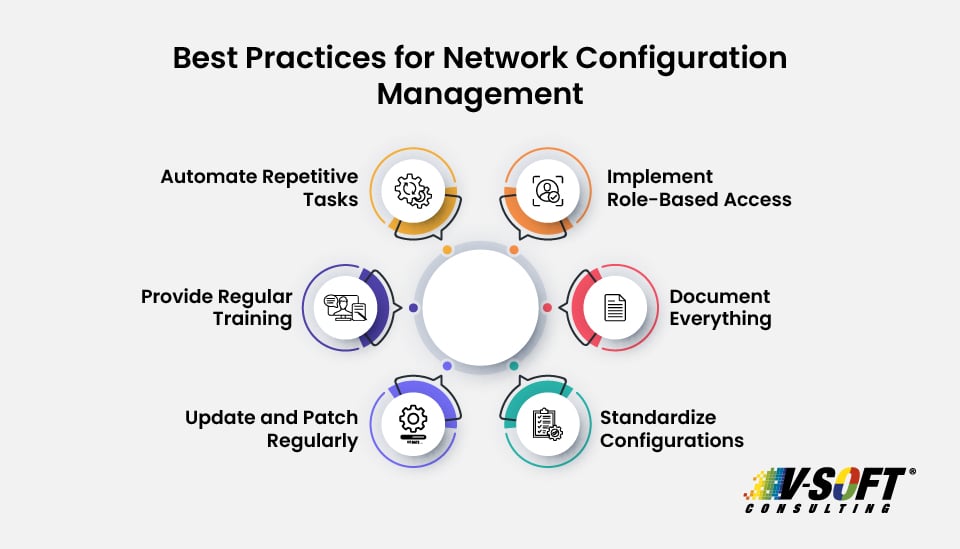
1. Automate Repetitive Tasks
Automation of repetitive tasks such as backups, software deployments, and patches will eliminate manual errors to improve operational efficiency. Use the right tool that fits your business to automate configuration deployments across multiple devices.
2. Implement Role-Based Access
Limit configuration access to authorized people only. With Role-Based Access Control (RBAC), you can ensure only the appropriate team can modify critical network settings, enhancing security.
3. Document Everything
From configuration items (CIs) to audit results, document everything so that it helps you during troubleshooting and ensures compliance. Follow an effective documentation process as defined by your organization.
4. Standardized Configurations
Standardizing configurations ensures consistency across the organization. It not only reduces complexity but also makes it easy to manage and troubleshoot the IT environment.
5. Update and Patch Regularly
Protect against future vulnerabilities by keeping your network devices and components always updated with the latest firmware and patches.
According to a 2023 Gartner report, 40% of organizations will rely on consolidated platforms for cybersecurity validation by 2026, emphasizing the need for regular updates.
6. Provide Regular Training
Keep your IT team informed by providing continuous training on the NCM tools and processes so that they are aware of the emerging threats and the best practices they should follow for effective network management.
Important Read
For a deeper dive into emerging trends, check out the 5 key IT infrastructure trends in 2025.
Conclusion
Network configuration management is a key component of modern IT infrastructure. Use the right, effective tools that fit your business, implement robust processes, and follow the best practices for your business to ensure continuous network reliability. Whatever the scale of your business, you can invest in NCM to support your digital transformation journey and achieve operational efficiency.
Need help evaluating your existing tools and processes? Adopt automation and enhance your entire IT infrastructure!
Partner with V-Soft Consulting for comprehensive IT infrastructure solutions!
FAQs
- How often should network configurations be backed up?
Whenever a change is made, the backup should happen automatically. You can also back up weekly, which is good practice. Regular backups will help restore your system in case of failure or a cyberattack.
- Is network configuration management only relevant to large enterprises?
No. Small and medium-sized businesses (SMBs) also benefit by using the NCM tools, especially if they have limited IT staff.
- What is the difference between configuration management and network monitoring?
Though both focus on network health, there is a slight difference between them. Configuration management focuses on maintaining the correct settings and versions of network devices, whereas network monitoring tracks the performance, uptime, and availability of the network in real time.
- How do I choose the right network configuration management tool?
Your decision should begin with assessing the complexity of your network and the tools’ features like automated backups, real-time alerts, role-based access control, vendor support, and compliance reporting.
- Can network configuration management tools support cloud and hybrid networks?
Yes, modern network configuration management tools support both traditional hardware and cloud-based environments. They can manage configurations across virtual routers, firewalls, and SD-WAN setups.