



With the quest for improving efficiency and reducing manual efforts, organizations have over time depended on automation software in the form of macros. With the advent of Robotic Process Automation (RPA), most companies are now rethinking their automation strategy. Though both technologies seek to enhance productivity, they differ in terms of size, flexibility, scalability, and business value.
Choosing the most suitable automation method can determine the level of efficiency in your company. In this article, we explore the key differences between RPA and Macros, applications and limitations, and help you determine when and why you should transition.
What Are Macros?
Macros is a basic automation program that is commonly used in Microsoft Excel. Macros are tied to the environment they were created in. They can record and repeat a set of keystrokes or commands to perform repetitive actions, such as
- Formatting datasets
- Performing simple calculations
- Copying-pasting values between sheets
- Automating simple data entry
What Is Robotic Process Automation (RPA)?
RPA is software automation technology used for developing software robots that mimic human action across several digital programs and systems. RPA bots can:
- Log in to web sites
- Copy files from a folder to a folder
- Extract information from emails and PDFs
- Enter data into CRM or ERPs applications
- Trigger workflows between platforms
Unlike macros, RPA doesn't require drastic changes to the existing IT infrastructure. It can automate end-to-end business processes.
RPA solutions delivered 42% improved productivity, 0% data errors, and 64% savings in operational costs within three months. Ready to achieve results like these for your business? Talk to our RPA experts and find out how our experts drive measurable ROI with RPA.
RPA Vs. Macros: Key Differences
RPA-powered solutions and macros both can automate tasks, but here are a few features that differentiate their capabilities.
| Features | Macros | RPA |
| Scope | Limited to specific applications | Enterprise-wide, cross-application |
| Scalability | Low | High |
| Ease of Use | Easy for light tasks | Drag-and-drop easy |
| Integration | Poor system integration | Excellent integration through APIs |
| Maintenance | Hard to maintain as processes grow | Scalable and centralized management |
| AI & ML Capabilities | None | Typically includes integration with AI/ML |
| Security & Governance | Minimal | Enterprise-level with compliance |
Can RPA Completely Replace Excel Macros? When Are Macros Still Useful?
Macros are still useful, specifically, for small, recurring chores in a single desktop application. They are particularly suited to:
- Quick, one-time automation needs
- Simple formatting activities
- Single-person productivity needs
- Legacy application automation
If your business processes are spreadsheet-oriented or held within a few tools, macros will work for your business, at least in the short term.
Why Companies Are Shifting to RPA
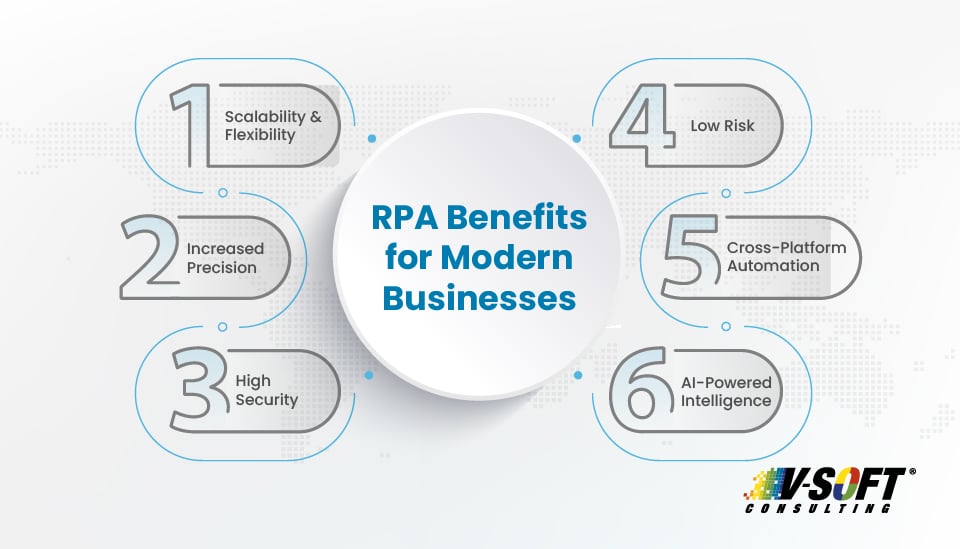
Businesses not only want to automate tasks but also gain access to data-driven insights. RPA platforms with AI capabilities bridge the gap. To stay competitive, RPA offers a future-proof solution that macros simply cannot match.
1. Scalability and Flexibility
Macros do not scale. When your business processes become complex and span several systems, such as ERP, CRM, and cloud applications, macros are unable to handle them. RPA robots, however, are designed to handle large amounts of work and can be easily scaled across departments.
2. Increased Precision and Low Risk
Macros are prone to errors and need human intervention when scripts are out of date. RPA provides exception handling, audit trails, and centralized controls to track and adjust processes.
3. Cross-Platform Automation
Unlike macros, which are tied to a specific tool, RPA can interact with multiple systems, like legacy systems, web browsers, and third-party applications, to automate multi-system processes easily without custom code.
4. AI-Powered Intelligence
Advanced RPA technologies can combine artificial intelligence and machine learning so that the robots can deal with unstructured information, make decisions, and learn from the experience. This allows RPA not just for rule-based processes but also for semi-cognitive processes like invoice classification, sentiment analysis, and anti-fraud.
Recommended To Read: Top RPA Implementation Challenges & Solutions to Overcome
Top Use Cases: Macros Vs. RPA in Real Business Applications
Finance & Accounting
- Macros: Robotic automation of expense reports in Excel
- RPA: End-to-end accounts payable processing, extracting data from invoices, PO number verification, ERP updating, and payment report generation
HR Operations
- Macros: Inputting employee info into a payroll sheet
- RPA: Automating Onboarding by extracting info from emails, HRMS updating, RPA in payroll, sending welcome packages, and issuing credentials
Customer Support
- Macros: Sending pre-defined responses in Outlook
- RPA: Automatically tracking service desk tickets, categorizing issues, and escalating them
Manufacturing and Logistics
- Macros: Automate data entry and generate reports within a single spreadsheet.
- RPA: Automate inventory management, order fulfillment, and logistics scheduling, reducing approximately 30% in downtime and over 35% increase in operational efficiency.
Learn more about How RPA Improves Customer Service in Retail Industry
Limitations of Macros You Can't Afford to Ignore
While macros may appear easy to use, they come with long-term disadvantages:
- Poor error handling: Prone to crash when file formats or UI objects are modified.
- No visibility: No dashboards or reporting to track performance.
- Restricted collaboration: Challenging to share between teams or normalize.
- Security risks: Vulnerable when macro-enabled documents are forwarded or downloaded from external sources.
When your business grows, so do your automation needs, and macros simply aren't designed to support it.
Best Practices for Upgrading to Modern RPA from Conventional Macros
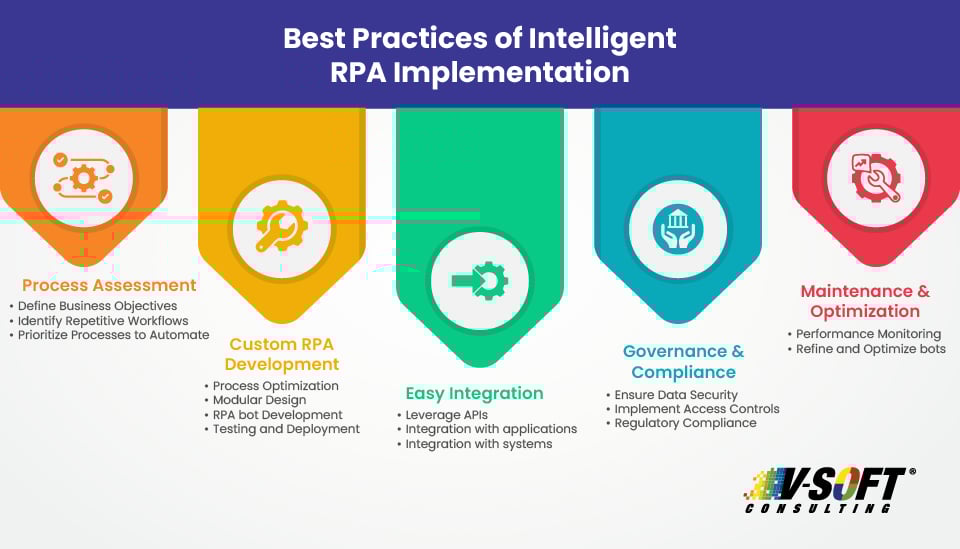
If you’re considering the transition from macros to RPA, start with a strategic assessment. Identify which processes are currently automated with macros and evaluate their limitations. Then, map out processes that could benefit from a more robust solution like RPA.
Choose a platform for RPA implementation that best suits your business needs. High-end vendors like UiPath, Automation Anywhere, and Blue Prism differ in functionalities, so compare them extensively. Start small, perhaps by automating a department or process and expanding gradually.
Don’t forget training and change management are also needed. While RPA tools are designed to be simple to use, they will still need to get used to a new skill set versus macros. Getting your teams trained and comfortable with the new system will be what provides an effortless transfer.
How V-Soft Consulting Helps You Make the Transition from Macros to RPA
V-Soft's RPA services help companies seamlessly migrate from limited macro-driven automation to scalable, secure, and smart RPA platforms. Here's how we help your RPA journey:
Process Assessment
Our RPA experts examine your existing macro-based processes and identify high-value RPA opportunities.
Custom RPA Development
With UiPath, Automation Anywhere, and Power Automate solutions, our experts create tailored bots that align with your business goals.
Easy Integration
Our RPA solutions works across your existing technology stack, from legacy systems to cloud platforms.
Governance and Compliance
V-Soft implements strong RPA governance models, ensuring auditability, role-based access, and industry compliance standards.
AI-Powered Automation
Want something more than rules-based robots? We add cognitive capability for intelligent decision-making and continued learning.
Conclusion: It’s Time to Move Beyond Macros?
If your company processes are increasingly complex, relying solely on macros will hold you back. They're great for narrow, simple situations, but they're not giving you the strength, smarts, and scalability that enterprises need today.
RPA is the obvious next step, providing higher ROI, increased efficiency, and future-ready automation. Whether you are beginning your automation journey or are upgrading from macros, we can help.
Let's discuss about automation that evolves with your business
FAQs
- How much does RPA implementation cost?
The implementation cost of RPA solutions will depend on the complexity of the project, customization needs, RPA vendor pricing models, infrastructure setup, licensing requirements, integrations, and ongoing maintenance & support. These factors influence the RPA implementation cost.
- How does RPA implementation save costs?
According to the reports, employees will spend over 50% of their productive hours on repetitive tasks. RPA solutions can reduce manual efforts and deliver significant cost savings.
- Are RPA bots more secure than macros?
Both RPA and macros can be secure or vulnerable to risks. It depends on how they have been implemented, integrated, and managed. Though RPA provides more advanced functionalities than macros, it can impose potential security risks if not implemented properly. Reliable RPA consulting partners ensure secure deployments that are future-proof.
- How does error handling differ between RPA and macros?
The scope of error handling in macros is limited and can manage errors within a single application. On the other hand, RPA offers advanced error-handling mechanisms, such as exception handling, logging, and logic implementation, as it deals with errors across multiple applications and systems.
- RPA or Macros: Which offers better integration with modern enterprise systems?
Macros are best suited for automation within a single application, but the revolutionary, scalable RPA solutions can integrate with various systems and workflows, making them more suitable for modern enterprise systems.