



Along with technological advancements, cyber attackers are also evolving. They can seamlessly exploit vulnerable areas of your network within minutes. So, organizations must implement a full-stack security framework around their network and applications to remain on top of critical cyber risks that stay unpatched, compliance gaps, and potential data disasters.
As ServiceNow consultants, we see this problem daily across our clients’ environments. The solution isn’t only deploying more scanning tools; it’s adopting a smarter, automated vulnerability management solution, ServiceNow Vulnerability Response (VR).
With best practices in ServiceNow consulting and implementation services, today, we would like to help you learn more about how ServiceNow’s threat intelligence capabilities provide visibility into your IT assets and possible risks and manage your organization’s security posture.
Why ServiceNow Vulnerability Response Matters in Optimizing Security Posture?
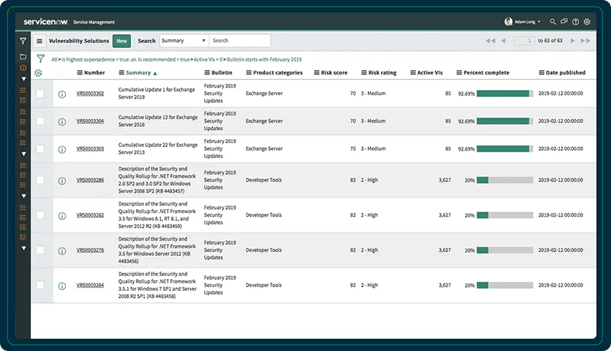
ServiceNow Vulnerability Response is a significant application within ServiceNow SecOps, a robust module that streamlines and automates incident and vulnerability management, providing transparency between security teams who find vulnerabilities and IT teams who fix them. It also works closely with several core ServiceNow modules, such as Governance, Risk, and Compliance (GRC) and IT Service Management (ITSM), to deliver value.
Benefits of ServiceNow Vulnerability Response
Here’s are features and benefits that set ServiceNow’s VR apart:
- ServiceNow VR and Service Graph Connector applications help organizations import risks from scanners, such as Tenable, Qualys, and Rapid7.
- By supporting integration with the ITSM platform, ServiceNow VR ensures seamless remediation flows into change, incident, and problem management processes.
- Maps vulnerabilities to the CMDB, increasing visibility into which services and assets are at risk. This ensures centralized vulnerability management and a consolidated view of security risks within the ServiceNow platform.
- Prioritizes security risks based on their impact on business and IT operations, not just on CVSS scores.
- By automating workflows, ServiceNow VR routes remediation tasks into IT’s queue, reducing time to resolve security and compliance issues.
- ServiceNow’s VR provide audit-ready dashboards for real-time compliance and executive reporting.
Thus, instead of endless lists of vulnerabilities, ServiceNow threat intelligence reports provide clear, prioritized, and actionable remediation steps, all within the ServiceNow platform.
Recommended Read: Why Enterprises Should Choose ServiceNow SecOps
Top 5 Mistakes That Organizations Make in Vulnerability Management: How ServiceNow Fixes Them
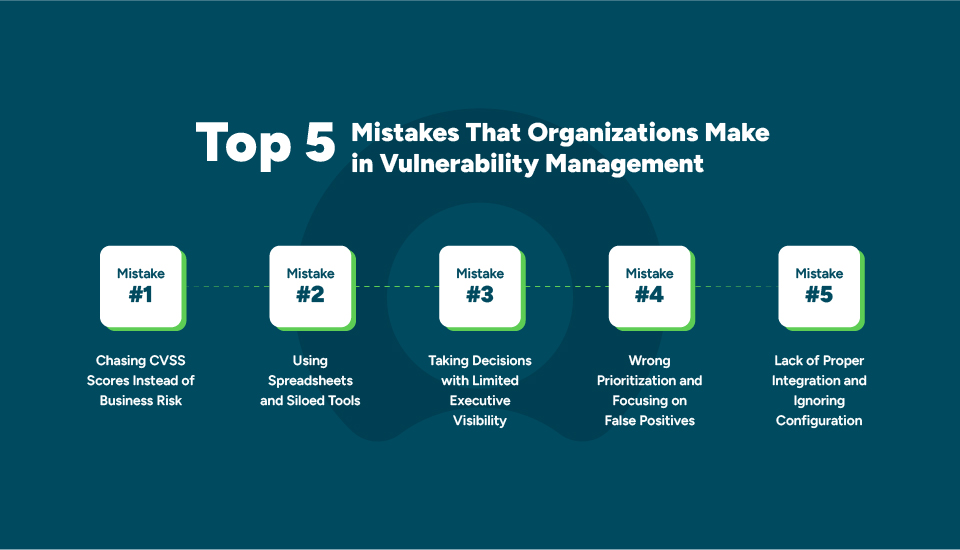
From consulting engagements across IT, healthcare, finance, and retail, the same issues keep surfacing. The key challenges that most organizations face include:
Mistake 1: Chasing CVSS Scores Instead of Business Risk
Security teams rush to patch based on CVSS scores alone. They spend days fixing low-risk issues while business-critical systems remain exposed.
The Solution: ServiceNow consulting partners intelligently connect vulnerabilities to your CMDB, layer threat intelligence, and assign prioritizations for vulnerabilities. It helps organizations to build robust security patches for what truly matters to your business first, not just what a scanner labels as critical.
Mistake 2: Using Spreadsheets and Siloed Tools
Due to a lack of centralized visibility into the vulnerabilities across spreadsheets, emails, or siloed tools, organizations might experience delayed IT ticket resolutions, reduced workflow efficiency, and impacts on overall IT and security operations.
The Solution: ServiceNow SecOps’s VR feature integrates scanner data directly into ITSM, ensuring automated workflows from issue identification to assignment to remediation.
Mistake 3: Taking Decisions with Limited Executive Visibility
Information security officers and auditors highly rely on outdated reports with no real-time insights into actual data. It leads to missed SLAs, compliance gaps, and errors in audits.
The Solution: ServiceNow vulnerability response dashboards are built for executives and auditors. It allows leadership and roles to monitor which vulnerabilities are on track, which are overdue, and which are violating compliance requirements, without requiring any spreadsheets before an audit.
Mistake 4: Wrong Prioritization and Focusing on False Positives
Security teams need to manage thousands of vulnerabilities monthly. In this scenario, critical issues might get buried, leaving exploitable risks wide open. Conventional Common Vulnerability Scoring System (CVSS) might miss context, and what matters is the business risk.
The Solution: ServiceNow VR automatically removes duplicates and prioritizes vulnerabilities based on their business impact. ServiceNow ensures a risk-based prioritization, so regulated systems, revenue-generating apps, or complex data systems get patched first.
Mistake 5: Lack of Proper Integration and Ignoring Configuration Issues
The security team will work with scanners and IT in resolving ticketing issues. This gap causes delays. An efficient vulnerability management strategy helps organizations bring security, IT, and leadership all to operate through a unified platform.
The Solution: ServiceNow VR application can seamlessly integrate disconnected security tools and configuration management databases (CMDBs) while automating configuration analysis, reducing significant security gaps, and streamlining end-to-end vulnerability management processes.
ServiceNow Vulnerability Response App Installation Process
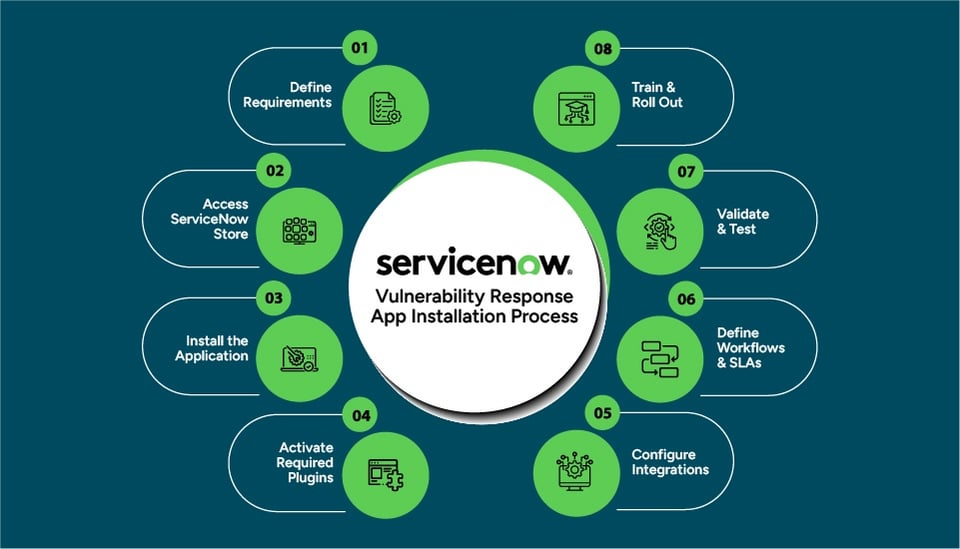
1. Define Requirements
Ensure you are running a supported ServiceNow release and have the Security Incident Response (SIR) or required plugins available.
2. Access ServiceNow Store
Confirm admin access and log into the ServiceNow Store with your admin credentials and select the vulnerability response application package.
3. Install the Application
Install the Vulnerability Response app into your ServiceNow instances, such as SecOps, GRC, and Integrated Risk Management (IRM). Installation typically takes a few minutes.
4. Activate Required Plugins
Once installed, activate related plugins like vulnerability integrations, such as Qualys, Tenable, Rapid7, etc., to enable scanner integrations.
5. Configure Integrations
Set up connections with your vulnerability scanners, CMDB, and threat intelligence sources. This ensures vulnerabilities flow into ServiceNow and are linked to your IT and security assets.
6. Define Workflows & SLAs
Configure automated workflows for remediation tasks, assign ownership to IT teams, and set SLAs for vulnerability closure based on severity.
7. Validate & Test
Run a test ingestion from your scanner, check data mapping with CIs, and validate that remediation tasks are being generated correctly.
8. Train & Roll Out
Provide short training sessions for security and IT teams. Roll out custom dashboards and reports for ongoing visibility into vulnerabilities and remediation progress.
How does ServiceNow Vulnerability Response Work?
Vulnerability Response works by acting as a bridge between vulnerability scanners, IT operations, and business context. Instead of just listing vulnerabilities, this advanced application prioritizes and automates risk remediation in a structured workflow. Here’s a step-by-step overview of ServiceNow Vulnerability Response process:
Vulnerability Data Ingestion
- Initially, ServiceNow VR integrates with external scanners like Qualys, Tenable, Rapid7, or cloud security tools.
- Vulnerability data is imported into ServiceNow.
- Assets from scanners are matched with ServiceNow’s CMDB for context to check which applications, services, or business units they support.
Normalization & Deduplication
- Now, VR normalizes vulnerabilities across different scanners.
- Identifies and normalizes duplicates.
- Ensures accuracy of vulnerabilities.
Risk-Based Prioritization
- Vulnerabilities are enriched with threat intelligence feeds.
- Business impact is factored in from the CMDB and prioritized.
- Now, VR calculates a risk score so teams can focus on the high-priority vulnerabilities.
Workflow & Task Automation
- VR automatically creates remediation tasks in ServiceNow and assigns them to the respective IT operations or application owner.
- Integrates with ITSM’s Change Management if remediation requires patching or downtime.
- Supports SLAs and escalations to keep teams accountable.
Remediation & Tracking
- IT teams apply patching, configuration changes, or mitigations as needed.
- Updates are tracked in real-time in the VR application.
Validation & Closure
- After remediation, vulnerabilities can be re-scanned by the scanner.
- Now, VR validates the fix and closes the task automatically if the vulnerability is no longer detected.
- Full audit trails are maintained for compliance and reporting.
Reporting & Dashboards
- VR provides customized dashboards for executives, security teams, and IT teams to manage and deal with vulnerabilities at different stages.
- Tracks metrics like Mean Time to Remediate (MTTR) and compliance readiness, helping organizations measure the effectiveness of vulnerability management.
Use Cases of ServiceNow Vulnerability Response Application
1. Centralized Vulnerability Management
ServiceNow VR consolidates vulnerabilities from multiple scanners into a single system, providing security teams complete visibility into risks and avoiding the chaos of managing findings in separate tools.
2. Risk-Based Prioritization
The ServiceNow Vulnerability Response application prioritizes security issues using CVSS scores, threat intelligence, and business impact, ensuring that teams focus on the most critical risks.
3. Automated Remediation Workflows
Vulnerability response automatically creates remediation tasks and assigns them to the right IT teams. It integrates with ITSM’s change and incident management, ensuring that fixes and progress are tracked to closure.
4. Integration with CMDB
By linking vulnerabilities to Configuration Items (CIs) in the CMDB, teams can see exactly which systems and services are impacted. This context helps prioritize vulnerabilities that affect business-critical assets.
5. SLA & Compliance Tracking
Organizations can define SLAs for remediation, such as fixing critical vulnerabilities within 7 days. ServiceNow VR tracks compliance against these SLAs and provides audit-ready reports for regulatory frameworks.
6. Threat Intelligence Integration
ServiceNow VR enriches vulnerability data with threat intelligence feeds. This allows teams to identify which vulnerabilities are actively being exploited and reduce noise by filtering out less relevant issues.
7. Reporting & Dashboards
Real-time dashboards give CISOs, security managers, and IT teams visibility into vulnerability trends, status, and SLA performance. Leadership and executives also get clear reporting on overall risk posture.
8. Incident Correlation
ServiceNow vulnerability response integrates with SIR to correlate vulnerabilities with actual security incidents. It helps teams determine if unpatched vulnerabilities are being exploited in active threats.
9. Cloud & Container Vulnerabilities
Modern environments like AWS, Azure, and GCP cloud are covered too. ServiceNow VR ingests vulnerabilities from cloud-native and container scanners to give a complete security view.
10. End-to-End Remediation Orchestration
Through integrations with tools like Intune or Tanium, VR can automate patch deployments. It verifies remediation and closes out vulnerability records, reducing manual effort and speeding up response.
Recommended Read: Benefits of ServiceNow SecOps
Best Practices to Utilize ServiceNow Vulnerability Response Application
1. Integrate All Vulnerability Data Sources
Bring all data from scanners, cloud platforms, and containers to get a single source of truth for vulnerabilities.
The Result: It eliminates siloed data, gives a single platform to view all possible issues, and ensures nothing is overlooked.
2. Leverage CMDB for Business Context
Link vulnerabilities to CIs, so you can prioritize issues that impact critical business operations.
The Result: It helps prioritize vulnerabilities based on the business criticality of assets, reducing risk to high-value services first.
3. Focus on Risk-Based Prioritization
Go beyond severity scores, use exploit data, business impact, and threat intelligence to address the vulnerabilities that matter most.
The Result: This avoids wasted effort on low-impact issues and ensures teams tackle the vulnerabilities most likely to be exploited.
4. Automate Remediation Workflows
Assign remediation tasks automatically to the right IT teams and connect with Change Management for seamless patching.
The Result: It speeds up response times, reduces manual errors, and ensures accountability by routing tasks directly to the right teams.
5. Define Clear SLAs and Monitor Compliance
Set remediation timelines based on risk levels (e.g., critical issues in 7 days) and track adherence with dashboards and reports.
The Result: It improves accountability, enforces timely remediation, and supports compliance with internal policies and regulatory standards.
6. Correlate with Security Incidents
Integrate with Security Incident Response to see if vulnerabilities are being exploited and prioritize accordingly.
The Result: It identifies vulnerabilities tied to active threats, helping security teams prioritize fixes that reduce immediate attack surface.
7. Leverage Dashboards and Reporting
Provide real-time visibility for security teams and executives, tracking progress, bottlenecks, and overall risk posture.
The Result: It provides real-time visibility for stakeholders, supports decision-making, and simplifies audit and compliance reporting.
8. Continuously Improve Processes
Regularly review performance, fine-tune workflows, and adapt as your IT and security landscape evolves.
The Result: It ensures the vulnerability management program matures over time, adapts to new threats, and increases overall efficiency.
These practices ensure you don’t just detect vulnerabilities but also prioritize, remediate, and report effectively with full business alignment.
Conclusion
For IT companies, ServiceNow Vulnerability Response isn’t just a tool, it’s a smarter way to reduce risks, speed up remediation, and build client trust. By uniting security with IT workflows, you move from firefighting to proactive protection.
Take control of your vulnerabilities before they take control of you.
FAQs
- Is ServiceNow good for vulnerability response?
Yes. ServiceNow Vulnerability Response helps organizations prioritize vulnerabilities, automate remediation workflows, assign tasks to the right teams, and track remediation progress. It can also integrate vulnerability data from security tools, helping security and IT teams manage vulnerability response within a centralized platform.
- What’s the difference between ServiceNow Vulnerability Response and ServiceNow Vulnerability Management?
ServiceNow Vulnerability Management is the broader process of identifying, assessing, prioritizing, and remediating security vulnerabilities. ServiceNow Vulnerability Response is a ServiceNow security capability that helps organizations automate vulnerability prioritization, remediation workflows, task assignment, and tracking within the ServiceNow platform.
- What does the ServiceNow Vulnerability Response workflow look like end to end?
The ServiceNow Vulnerability Response workflow typically follows these steps: import vulnerability data → identify and prioritize vulnerabilities → create remediation tasks → assign tasks to responsible teams → track remediation progress → validate remediation → close the vulnerability. ServiceNow helps centralize vulnerability data and automate workflows so security and IT teams can coordinate remediation from identification through resolution.
- Which scanners integrate with ServiceNow Vulnerability Response?
ServiceNow Vulnerability Response integrates with major vulnerability and security platforms, including Tenable, Qualys, Rapid7, Microsoft Defender, and Wiz. These integrations import vulnerability findings into ServiceNow, match them with CMDB assets, and support vulnerability prioritization and remediation workflows. ServiceNow also supports integrations with other security and vulnerability tools, depending on the use case and application.
How do you automate vulnerability remediation and ticket creation in ServiceNow?ServiceNow automates vulnerability remediation by importing findings from security scanners, prioritizing vulnerabilities based on risk, and automatically creating and assigning remediation tasks to the appropriate teams. ServiceNow Vulnerability Response can use workflows and automation to route tickets, track remediation progress, and update or close tasks after vulnerabilities are resolved and validated.
What roles and permissions are required for ServiceNow Vulnerability Response?ServiceNow Vulnerability Response uses role-based access controls to manage access to vulnerability data, remediation tasks, vulnerability prioritization, and administrative functions. Common ServiceNow Vulnerability Response roles include vulnerability managers, vulnerability analysts, remediation owners, and administrators, with permissions assigned based on their responsibilities. The exact roles and access requirements can vary by ServiceNow version and implementation.