



ServiceNow is one of the leading players in IT Service Management. It offers various integration tools to help integrate applications used by various departments and streamline the company’s data and workflow. One of the latest integration endpoints released by ServiceNow is for Microsoft Teams.
While ServiceNow can be very effective in ITSM and enable enterprise workflows, when it comes to collaboration, Microsoft Teams is a leader in its field. As of early 2024, Microsoft Teams has a user base of 320 million monthly active users. The ServiceNow and Teams integration can pave the way to enhanced user experiences.
You can also check out our case study on Microsoft Cloud Office 365 migration to understand how we support Microsoft-based enterprise transformations.
Benefits of Integrating Microsoft Teams with ServiceNow
Both Microsoft Teams and ServiceNow are powerful enterprise tools. Together, they can create a seamless and efficient workplace experience. Some of the key benefits include:
- Improved Productivity: Employees don’t have to leave Microsoft Teams to create, manage, and resolve ServiceNow tickets. They can do it effortlessly within the portal and save valuable time.
- Faster Issue Resolution: The real-time collaboration features in Teams such as chat, screen sharing, and calls allow IT agents to continuously discuss with the requester to solve their problems in real time.
- Enhanced User Experience: Most ticketing platforms are complex. But Microsoft Teams has a familiar interface, removing the complexity and allowing employees to interact efficiently.
- Greater Accessibility: A majority of corporate companies use Teams, making it easy to report issues from anywhere without VPN access.
- Streamlined Communication: Be it conversations, shared files, or ticket updates, everything stays in a centralized Teams channel improving traceability and transparency.
Implementing Microsoft Teams has enabled information workers to save up to 4 hours per week through improved collaboration and information sharing.
“Together, these benefits improve service delivery, increase employee satisfaction and digital workflow efficiency.”
Why is ServiceNow and Microsoft Teams Integration a Game Changer?
Embedding workflows in this vast collaborative space helps IT and HR teams continue to use ServiceNow and at the same time collaborate to resolve issues directly in Microsoft Teams.
The ServiceNow virtual agent integration with Microsoft Teams is available to customers using the ServiceNow Paris release or later. The feature can build automated conversations to help users get required information on tickets reported in ServiceNow.
Organizations leveraging ServiceNow's Virtual Agent have observed a significant reduction in ticket resolution times, enhancing user satisfaction and operational efficiency.
From the user’s perspective, incident management is a process with a limited scope of instant communication and requires additional time and effort to raise a ticket and follow the process of resolution. This is mainly because the ticketing systems are internally hosted or accessed through existing VPN locations and may even require login credentials.
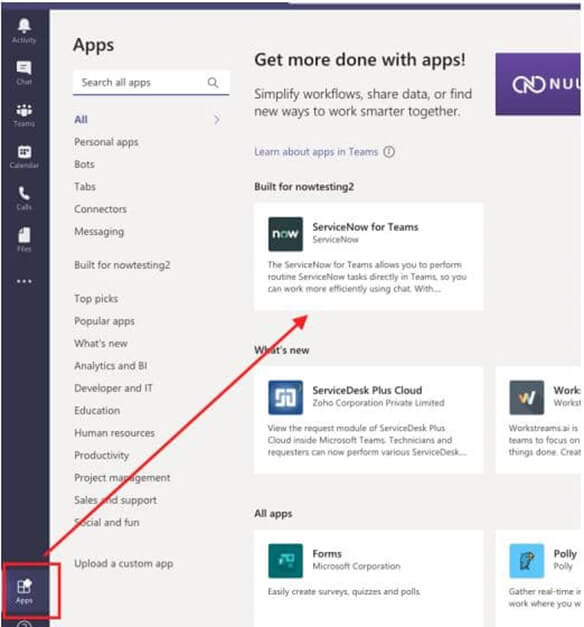
Allowing users to open tickets within Microsoft Teams is much more user-friendly as laptops and mobile phones already have the software installed for communication and collaboration.
The user simply needs to fill out a form providing details through Microsoft Teams and a corresponding ticket is automatically created in the ServiceNow platform. The required fields are automatically populated with the information provided by the user. This is a much easier approach than having the user access an internal page through VPN, login, and then open a ticket after providing details.
Furthermore, while creating a request through the ServiceNow and Microsoft integrated solution, a new channel would be created in Microsoft Teams through which the user and the agent can communicate. This channel can be used for sharing screenshots and other details which can help to reduce incident resolution times.
To further streamline the process, this integration would allow the agent to chat with the employee on Teams, request items, change requests and attach the chat transcript to the ticket as a comment. The screenshots and comments from Teams are attached to the ticket, equipping the agent with the latest information to communicate with the user.
Using the Chat-to-Call capability, an employee can be invited by the agent to a Microsoft Teams call from a live chat and use Teams features including video calls and screen-sharing to resolve issues promptly.
Step-by-Step Process for Integration
Before proceeding, it’s also helpful to understand how the ServiceNow Integration Hub plays a key role in connecting third-party apps like Microsoft Teams.
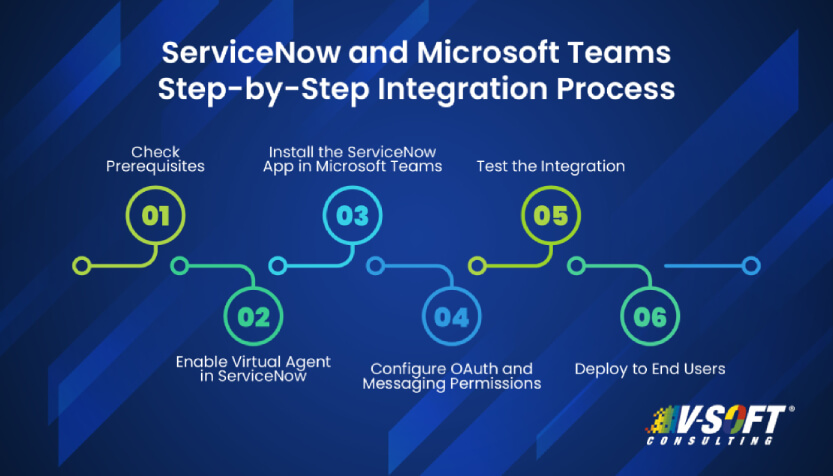
ServiceNow and Microsoft Teams can be integrated in a few simple steps. Here's how organizations can enable this integration:
-
Check Prerequisites
- Make sure you are using at least the ServiceNow Paris release or later.
- Verify whether your Teams platform has the required admin privileges.
- Check if your organization has bought licenses for both platforms and are functional.
-
Enable Virtual Agent in ServiceNow
- In the ServiceNow admin console, enable the Virtual Agent plugin.
- Configure conversation topics that can be accessed via Teams.
-
Install the ServiceNow App in Microsoft Teams
- Go to the Teams App Store. Search for ServiceNow and install the app.
- Give necessary permissions and validate the connection between the two platforms.
-
Configure OAuth and Messaging Permissions
- In ServiceNow, configure OAuth credentials to securely connect to Microsoft Teams.
- Set up messaging policies and user permissions to ensure proper data exchange.
-
Test the Integration
- Try creating a sample ticket, check its status, and even chat conversations to ensure the system behaves as expected.
- Use the Teams interface to interact with the Virtual Agent and confirm if the tickets are being created in ServiceNow.
-
Deploy to End Users
- Roll out the functionality organization-wide.
- Provide training for employees and give them guides to help them understand how to use the integration effectively.
According to Gartner's 2023 Market Share reports, ServiceNow secured the #1 position in five and #2 in one of the technology workflow markets, highlighting its dominance in the industry.
By following these steps, organizations can bridge the gap between service management and real-time communication, unlocking a more collaborative, responsive, and user-friendly IT support environment.
Conclusion
With the ServiceNow and Microsoft Teams integration, the latter becomes a front-end tool for opening, updating, and closing tickets. Users do not need to learn new tools or even switch from the Teams platform to raise incidents. This can lead to enhanced user experience when it comes to incident management using ServiceNow.
To explore further, here are the advantages of integrating ServiceNow with other business applications that can elevate enterprise productivity.
FAQs
-
Do I need admin rights to set up the ServiceNow and Microsoft Teams integration?
Yes, admin privileges are required on both ServiceNow and Microsoft Teams to install apps, configure permissions, and establish secure connections.
-
How does the ServiceNow Virtual Agent and Teams integration help IT support?
The ServiceNow Virtual Agent and Teams integration enables users to interact with automated workflows, resolve issues, and get status updates right within Microsoft Teams.
-
Is this integration compatible with older versions of ServiceNow?
You must use at least the Paris release or a later version. Earlier versions may not support features like Virtual Agent or seamless ticket creation within Teams.
-
What can I do with Microsoft Teams integration with ServiceNow Virtual Agent?
With the Microsoft Teams integration with ServiceNow Virtual Agent, users can chat with the bot, raise incidents, and receive updates all in real time within Teams.
-
Do end users need training to use this ServiceNow and Teams integration?
Yes, but only basic training is recommended. Since most users are already familiar with Teams, adapting to the integration is easy.