



Human resources are central to employee experience, workforce operations, and organizational performance. Yet disconnected HR systems, manual processes, and repetitive employee requests can make it difficult for HR teams to deliver consistent, efficient services.
ServiceNow HR Service Delivery helps organizations address these challenges by connecting employee services, HR case management, knowledge, and workflows on a unified platform. From onboarding to employee relations and AI-assisted support, ServiceNow HRSD provides a structured way to deliver HR services across the employee lifecycle.
In this guide, we explore ServiceNow HRSD features, modules, AI-powered automation, implementation best practices, licensing considerations, use cases, and business benefits.
What Is ServiceNow HR Service Delivery (HRSD)?
ServiceNow HR Service Delivery (HRSD) is a cloud-based solution built on the ServiceNow platform that helps organizations manage employee requests, automate HR processes, and deliver workforce services through connected workflows.
ServiceNow HRSD brings together capabilities such as HR case management, knowledge management, employee self-service, employee lifecycle workflows, and reporting. Employees can use centralized service channels to find information, submit requests, and track their cases, while HR teams gain structured processes for managing and resolving those requests.
The objective is to make HR services easier to access, more consistent to manage, and more visible across the organization.
How ServiceNow HRSD Transforms HR Service Delivery
ServiceNow HRSD helps organizations move from fragmented, manually coordinated HR services towards connected and standardized service delivery.
- Centralized Employee Services
Employees can access HR services, policies, knowledge articles, and requests through a centralized experience instead of navigating multiple systems or relying on email-based support.
- Consistent HR Case Management
HR requests can be captured, categorized, assigned, tracked, and resolved through structured case workflows. This provides clearer ownership and visibility into request status and resolution progress.
- Improved Employee Experience
ServiceNow Employee Center centralizes HR services, knowledge articles, and requests. Employee Journeys automate personalized onboarding, transfers, and offboarding, while Virtual Agent enables conversational self-service.
- Reduced Manual Coordination
Workflow automation can coordinate approvals, notifications, assignments, and related tasks. This can reduce repetitive administrative work and allow HR teams to focus on cases that require greater attention.
- Greater Operational Visibility
HR leaders can use reporting and analytics to understand case volumes, resolution trends, service-level performance, backlogs, and recurring employee inquiries.
The result is a more structured approach to HR service delivery that connects employee needs with the people, information, and workflows required to address them.
ServiceNow HRSD Modules and Core Capabilities
ServiceNow HRSD includes applications and capabilities that support different aspects of employee service delivery.
| ServiceNow HRSD Module | ServiceNow HRSD Capability |
|---|---|
| HR Case and Knowledge Management | Manages employee inquiries, HR cases, and knowledge articles |
| Employee Center | Provides a centralized destination for employee services |
| Employee Journey Management | Coordinates personalized employee experiences across lifecycle events |
| Enterprise Onboarding and Transitions | Manages onboarding, transfers, and offboarding activities |
| Employee Relations | Supports structured handling of sensitive employee matters |
| HR Service Catalog | Organizes HR services and request options |
| HR Agent Workspace | Helps HR professionals manage and resolve cases |
| Reporting and Analytics | Provides visibility into HR service performance |
These modules can be configured around an organization's HR operating model, employee population, service requirements, and integration landscape.
ServiceNow HRSD Package Features: Foundation vs. Advanced vs. Prime
ServiceNow HRSD packaging and available capabilities can evolve as the platform introduces new functionality. The appropriate package depends on an organization's HR service requirements, employee experience objectives, workflow complexity, AI needs, integrations, and scale.
ServiceNow has introduced newer packaging terminology alongside capabilities that were previously discussed using terms such as Standard, Professional, and Enterprise. Organizations should evaluate current product packaging and entitlements rather than assume that legacy terminology maps directly to current offerings.
ServiceNow HR Foundation Features
HR Foundation provides core HR service capabilities alongside AI-powered employee support. Key features include:
- Case and Knowledge Management
- Employee Center Pro
- AI Agents for HR
- Moveworks for HR
- Virtual Agent
- Talent capabilities for hiring and growth
- AI Control Tower
Best suited for: Organizations establishing a centralized HR service experience with case management, employee self-service, and AI-enabled support.
ServiceNow HR Advanced Features
HR Advanced includes HR Foundation capabilities and adds broader workflow automation, employee journey management, and analytics. Key features include:
- Agentic Workflows
- Employee Journey Management
- Voice Agents for HR
- Process Mining
- Platform Analytics
- Advanced Mobile Publishing
- Universal Request Pro
Best suited for: Organizations looking to automate complex employee journeys, improve HR operational visibility, and expand AI-enabled service delivery.
ServiceNow HR Prime Features
HR Prime includes HR Foundation and HR Advanced capabilities, adding AI-driven capabilities for more autonomous HR operations. Key features include:
- AI Specialists
- Autonomous Service Desk
- Custom AI Workflows
Best suited for: Organizations pursuing more autonomous HR service operations, including end-to-end case resolution and AI-driven workflow execution.
ServiceNow HR Foundation vs. HR Advanced vs. HR Prime
| Feature area | HR Foundation | HR Advanced | HR Prime |
|---|---|---|---|
| Core case and knowledge management | Included | Included | Included |
| Employee Center Pro | Included | Included | Included |
| AI agents and skills | Included capabilities | Foundation capabilities plus Advanced additions | Foundation and Advanced capabilities plus Prime additions |
| Agentic workflows | — | Included | Included |
| Employee Journey Management | — | Included | Included |
| Voice Agents for HR | — | Included | Included |
| Process Mining and Platform Analytics | — | Included | Included |
| AI Specialists | — | Included | Included |
| Autonomous Service Desk | — | — | Included |
| Custom AI Workflows | — | — | Included |
Which ServiceNow HRSD package should you choose?
Choose HR Foundation for core HR service delivery and AI-enabled support, HR Advanced for broader employee journey automation and analytics, or HR Prime for more autonomous HR operations. Confirm the current product entitlements, applicable usage limits, and commercial terms with ServiceNow or an authorized partner before purchasing.
How Does ServiceNow HR Service Delivery Work?
ServiceNow HRSD follows a structured process that connects employee requests with HR teams, knowledge, and automated workflows.
- Step 1: Employee Submits a Request
Employees access Employee Center or an enabled service channel to ask a question, request a service, or report an issue.
- Step 2: HRSD Creates and Categorizes the Case
The platform captures the request and organizes it according to the service category, employee information, and applicable configuration.
- Step 3: Automated Assignment and Routing
Assignment rules direct cases to the appropriate HR team or representative based on configured conditions.
- Step 4: Workflow Execution
Approvals, notifications, tasks, and service-level targets help coordinate the resolution process.
- Step 5: Case Resolution
HR representatives review the request, provide information, complete required activities, and update the case.
- Step 6: Reporting and Continuous Improvement
HR leaders review case volumes, resolution trends, employee feedback, and operational performance to identify improvement opportunities.
This connected process helps organizations establish consistent HR service operations while giving HR teams greater visibility and control.
HR Service Automation with ServiceNow HRSD
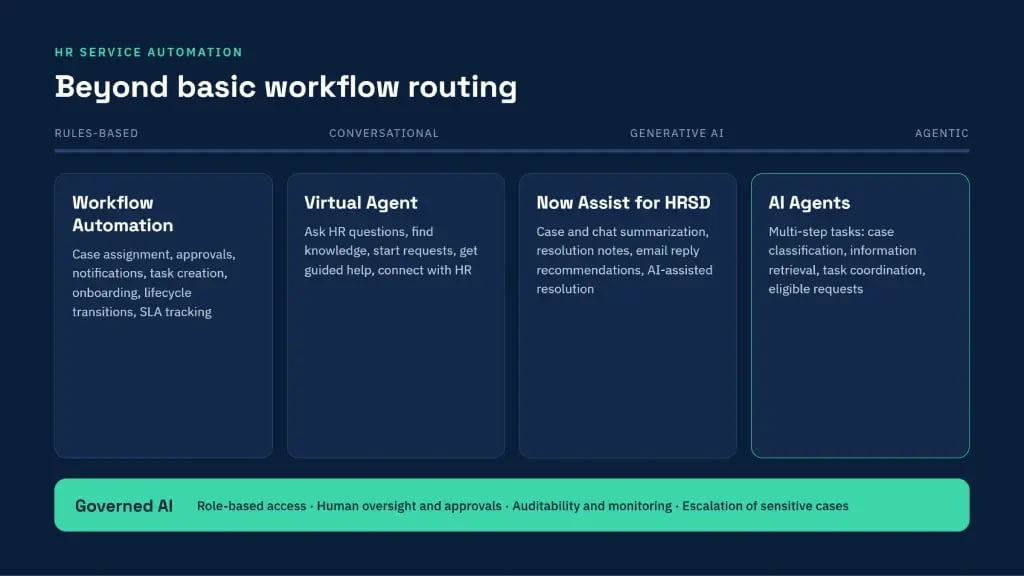
Automation is extending HR service delivery beyond basic workflow routing. ServiceNow HRSD can combine workflow automation, conversational experiences, generative AI, and AI agents to support employees and HR professionals.
New and emerging HR service automation features
Automation is extending HR service delivery beyond basic workflow routing. ServiceNow HRSD can combine workflow automation, conversational experiences, generative AI, and AI agents to support employees and HR professionals.
- Workflow Automation
HR workflows can automate repetitive activities such as:
- Case assignment
- Approvals
- Notifications
- Task creation
- Employee onboarding activities
- Lifecycle transitions
- Service-level tracking
Rules-based automation is particularly useful for high-volume processes with defined business requirements.
- Virtual Agent for Employee Self-Service
ServiceNow Virtual Agent provides a conversational interface through which employees can:
- Ask HR-related questions
- Find relevant knowledge articles
- Initiate service requests
- Receive guided assistance
- Connect with HR representatives when additional support is required.
This can make HR information and services more accessible without requiring employees to navigate complex service catalogs.
- Now Assist for HRSD
Now Assist adds generative AI capabilities to selected HR service workflows. Depending on product entitlement and configuration, capabilities may include:
- Case Summarization: Creates concise summaries of HR cases.
- Resolution Notes: Assists HR agents with resolution documentation.
- Email Reply Recommendations: Helps draft responses to employee inquiries.
- Chat Summarization: Summarizes conversations to support case handling.
- AI-Assisted Case Resolution: Supports configured workflows where AI can assist with resolution activities.
- AI Agents and Agentic HR Workflows
AI agents can extend automation by supporting multi-step tasks across connected workflows. Depending on configuration and governance controls, AI-driven workflows may assist with activities such as case classification, information retrieval, task coordination, and eligible service requests.
Organizations should define appropriate permissions, approval thresholds, escalation paths, and human oversight before deploying AI to sensitive HR workflows.
- Governed AI Automation
HR data can contain sensitive personal and employment information. AI-enabled HR service delivery therefore requires controls around:
- Role-based access and data permissions
- Human oversight and approval requirements
- Auditability, monitoring, and data handling
- Escalation of sensitive cases
AI can improve service responsiveness and reduce repetitive work, but consequential HR decisions and sensitive employee matters should remain subject to appropriate organizational controls and human review.
ServiceNow HRSD Best Practices for Successful Implementation
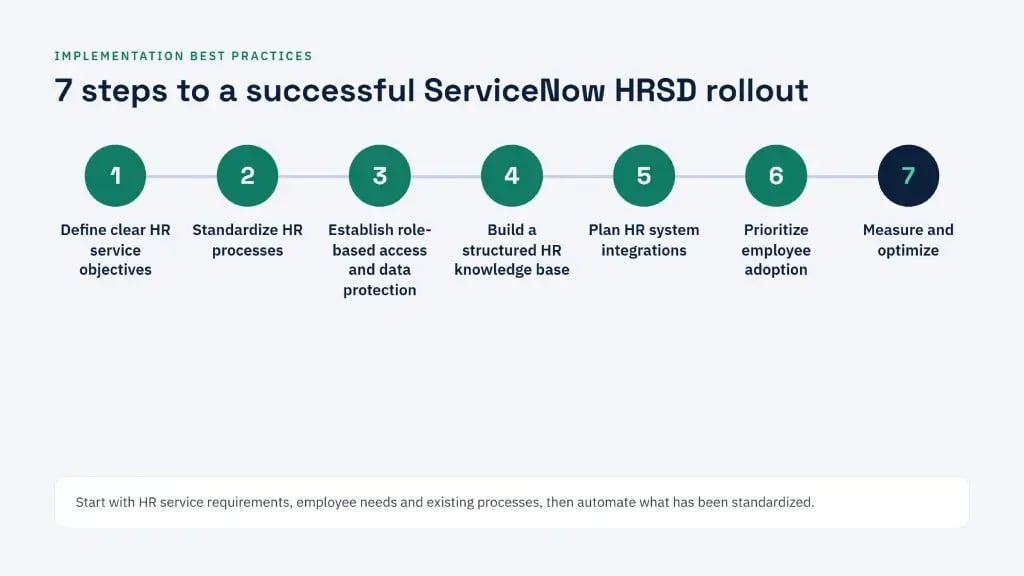
A successful ServiceNow HRSD implementation begins with understanding HR service requirements, employee needs, and existing processes.
1. Define Clear HR Service ObjectivesIdentify the business outcomes the organization wants to achieve, such as improving request visibility, increasing self-service adoption, or standardizing case management.
2. Standardize HR ProcessesReview existing HR workflows before automating them. Address unnecessary variations and establish consistent service processes where appropriate.
3. Establish Role-Based Access and Data ProtectionEmployee information often includes sensitive personal and employment data. Define access permissions, data visibility, retention requirements, and appropriate security controls.
4. Build a Structured HR Knowledge BaseOrganize policies, procedures, FAQs, and service information so employees can find accurate answers through self-service.
5. Plan HR System IntegrationsIdentify the HR systems of record, payroll applications, identity platforms, and enterprise tools that must exchange information with HRSD.
6. Prioritize Employee AdoptionDesign intuitive service experiences, communicate changes, and provide training to employees, HR agents, and administrators.
7. Measure and OptimizeTrack relevant KPIs, including:
- HR case resolution time
- First-contact resolution
- Employee satisfaction
- Self-service adoption
- Case backlog
- Workflow completion time
- Case deflection
Regular measurement helps organizations identify bottlenecks and determine where additional automation or process improvements may provide value.
Trending ServiceNow HRSD Use Cases Across Industries
ServiceNow HRSD supports employee service workflows across industries, although implementation requirements vary by workforce structure, regulatory environment, and operating model.
| Industry | HRSD use case | Application |
|---|---|---|
| Healthcare | Employee onboarding | Coordinate credentialing-related tasks, access requests, and department activities. |
| Banking and Financial Services | Employee lifecycle management | Standardize employee changes and approvals. |
| Manufacturing | Multi-location HR services | Provide consistent HR request handling across facilities. |
| Technology | Employee self-service | Centralize policy inquiries, benefits questions, and workplace requests. |
| Retail | Seasonal workforce onboarding | Coordinate high-volume employee onboarding activities. |
| Professional Services | Employee transitions | Manage transfers, role changes, and offboarding workflows. |
Employee Onboarding Example
Consider an organization hiring employees across multiple locations. Without a connected workflow, HR may need to coordinate forms, system access, equipment, training, and approvals through separate emails and spreadsheets.
With ServiceNow HRSD, onboarding can initiate a structured workflow that:
- Capture employee information
- Create tasks for HR and other departments
- Coordinate equipment and access requests
- Track pending activities
- Send notifications and reminders
- Provide visibility into onboarding progress
This creates clearer ownership and a more coordinated employee onboarding experience.
ServiceNow HRSD Benefits and Business Value
The business value of ServiceNow HRSD depends on how effectively the platform is aligned with HR processes, employee expectations, and organizational objectives.
- Improved HR Productivity
Automating routine activities reduces administrative coordination and allows HR professionals to focus on employee support and strategic workforce initiatives.
- Better Employee Experience
A unified service center gives employees a consistent way to find information, submit requests, and track progress.
- Greater Process Consistency
Standardized workflows help HR teams follow defined procedures across departments and locations.
- Increased Service Visibility
Case tracking and reporting help HR leaders understand workloads, identify bottlenecks, and monitor service performance.
- Scalable HR Operations
Reusable workflows and centralized service management help organizations extend HR services as workforce needs evolve.
- Stronger Data Governance
Role-based access, structured case records, and defined processes support controlled handling of employee information.
- Better Cross-Functional Coordination
Integrating HR workflows with IT, facilities, finance, and other enterprise functions helps coordinate activities that extend beyond HR.
Conclusion: Modernize Your HR Service Delivery with V-Soft
Modern HR delivery requires more than digitizing employee requests. It requires connected workflows, accessible information, secure data handling, and employee experience that works across the organization.
V-Soft helps enterprises plan, implement, configure, and optimize ServiceNow solutions around their operational requirements. From HR workflow automation and platform integration to employee service experience improvements, our ServiceNow expertise helps organizations move HR transformation from strategy to execution.
Are disconnected HR processes, manual case handling, or fragmented employee experiences slowing your HR operations?
Talk to V-Soft's ServiceNow Team
Frequently Asked Questions