



If your organization manages large, complex data centers that connect with robust IT infrastructure, then a single hardware failure can cost you a lot. Studies show that approximately 80% of server outages in data centers are happening due to hardware failure.
Moreover, where business downtime costs organizations thousands of dollars per minute, hardware reliability is not just an IT issue, it's a necessity. As digital transformation accelerates and hybrid infrastructures thrive, having efficient equipment is a strategic move to keep your IT infrastructure in good health.
Let us take a glance at the common reasons for hardware failures and how to avoid them to build a robust IT infrastructure that ensures seamless data transfers, secure connectivity, increased cost savings, and high scalability.
Top Reasons for Hardware Failure in IT Enterprises
Why do hardware failures occur? The reasons could vary but how organizations overcome them is what matters. Enterprises that rely on IT equipment must have deep understanding of the factors causing hardware damages to reduce the downtime as well as cut unnecessary maintenance costs.
5 Common Causes for Hardware Failures
- Component Wear-Outs: Hard drives, SSDs, and fans can degrade over time
- Power Issues: Power surges, unstable electricity, or faulty UPS units
- Thermal Stress: Overheating caused by poor ventilation or improper rack arrangement can damage hardware equipment
- Environmental Conditions: Dust, humidity, and external vibrations can damage sensitive components
- Software & Firmware Bugs: Outdated drivers or incompatible firmware can cause sudden crashes, resulting in system failures
- Poor Maintenance: Neglect of monitoring or preventive servicing results in unseen deterioration
What Top IT Vendors Do to Avoid Hardware Failures?
Top IT infrastructure vendors aggressively take technology-driven measures towards lowering hardware failure risks, improving system uptime, and developing fault-free environments. This is what top IT infrastructure vendors do to help businesses deploy high-performing, fault-free systems.
Key Strategies to Avoid Hardware Failures:
- Deploy Predictive Analytics & AI Monitoring
Incorporate AI-driven features into your infrastructure setup to monitor system health, detect anomalies, and forecast potential hardware failure ahead of time. This will allow your IT to replace or repair components prior to downtime occurring.
- Design Redundant & Fail-Safe Hardware Systems
Plan hardware redundancy like dual power supplies, hot-swapped hard disks, and RAID storage to eliminate single points of failure. These systems maintain operations even when one element fails, ensuring continuous service availability.
- Enhance Environmental Monitoring & Thermal Management
Leading IT infrastructure providers place sensors on hardware that monitor temperature, humidity, airflow, and power status in real-time. It prevents overheating, power-related damage, and physical degradation, which are the leading causes of hardware failure.
- Integrate Security into Hardware Lifecycle
Protect firmware corruption, unauthorized access, and hardware-level security risks. This strategy will strengthen hardware integrity and reduce failure due to compromised firmware or system breaches.
- Provide Lifecycle Management & Proactive Support Services
Reliable IT infrastructure service providers provide ongoing monitoring, remote diagnostics, and predictive service calls through advanced support offerings. It enables rapid response, preventive maintenance, and informed hardware lifecycle planning.
- Adopt Scalable & Modular Infrastructure Design
Modular, scalable systems that are easy to upgrade, replace, or service without full system downtime. This reduces risk during hardware expansion or refresh cycles.
If you're aiming for zero downtime, maximum reliability, and maximum IT performance, your IT infrastructure partner must focus on failure prevention through smart design, AI-powered monitoring, and service in advance.
What Tools Help You Monitor and Predict Hardware Failure?
Artificial Intelligence (AI) and Machine Learning (ML) powered predictive maintenance software solutions, and IoT-powered sensors for real-time condition and performance monitoring. Analytic tools, such as failure modes and effects analysis and root cause analysis, are leveraged for identifying potential failures and their impact on the entire IT system promptly.
What Maintenance Practices Prevent Hardware Issues?
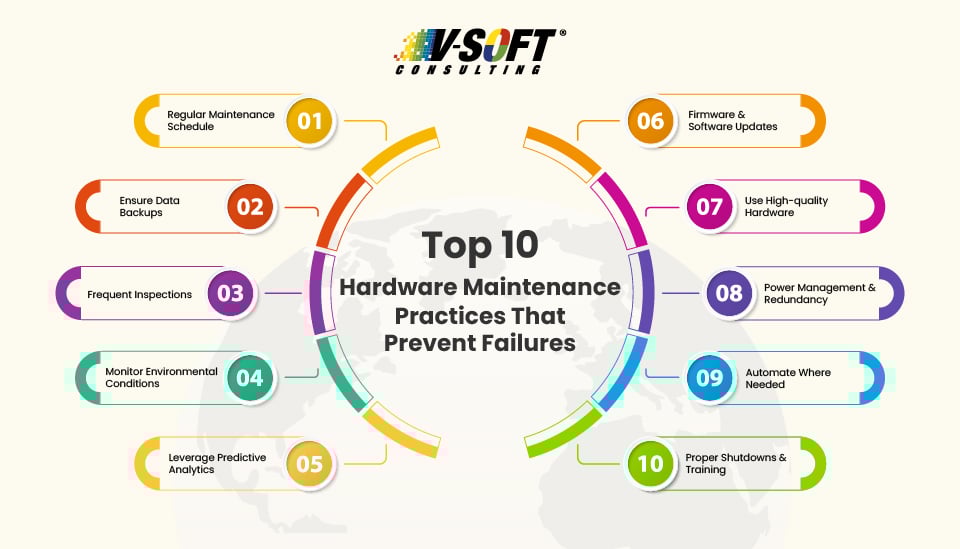
To ensure the optimal performance of your IT hardware, here are the best practices that avoid hardware overheating, physical damage, and data loss.
1. Monitor Environmental Conditions
Utilize sensors to monitor high temperature, humidity, airflow, and power stability in real time. This technique will protect your hardware from moisture damage and overheating, thus preventing costly downtime.
2. Implement a Regular Maintenance Schedule
To minimize hardware failures in IT infrastructure, it is necessary to implement a regular maintenance schedule, such as routine checks, software and firmware updates, and hardware inspections and testing. Automate where possible.
3. Perform Regular Data Backups
Regular data backups is one of the best IT maintenance practices to protect your valuable data from hardware failure.
4. Leverage Predictive Analytics
Leverage Machine Learning by current IT systems to detect anomalies, predict failures, and alert admins before a crisis occurs.
5. Use Certified Hardware
Invest in enterprise-grade and certified hardware to ensure high performance and longevity. High-quality hardware can operate reliably in any environmental conditions, significantly reducing the risk of failures.
6. Choose Proactive Support Contracts
Ensure your vendors offer responsive support, real-time monitoring, regular audit of your IT infrastructure, security assessments, predictive failure reports, and resolve issues before they escalate.
7. Utilize Redundancy
Implement RAID layouts, two power supplies, cluster configurations, and failover mechanisms to ensure continuity despite the failure of a component.
8. Virtualize Where Possible
This strategy helps in avoiding hardware failures in servers. Moving workloads to virtual machines or cloud platforms reduces dependency on single hardware points of failure.
Expert Guidance To Choose Your IT Infrastructure Partner: How to Choose the Right IT Infrastructure and Network Cabling Company
Overcome Hardware Failures with V-Soft Consulting
Avoiding hardware failures isn't just about fixing problems faster, it’s about preventing them from happening in the first place. V-Soft helps you build IT for resilience and scalability, not just for performance. Whether you’re managing an on-premise data center, running a hybrid cloud model, or scaling globally, success depends on:
- Choosing the right IT infrastructure company
- Building in fail-safes
- Embracing AI-powered monitoring
- Ensuring environmental and operational discipline
- A resilient IT infrastructure doesn't just survive the unexpected, it anticipates and adapts to thrive.
FAQs
- What are the signs that hardware might be close to failing?
Signs like reduced performance, overheating, external damage, and frequent noises indicate that your IT hardware might be close to failure. Troubleshooting common hardware issues on time is important to ensure robust IT.
- What is predictive maintenance and why is it important in IT?
Predictive maintenance uses AI and ML to assess hardware performance and predict failures in advance. Predictive maintenance allows IT staff to fix issues before they cause downtime, which saves money and improves system reliability.
- Is it worth investing in high-quality hardware for small businesses?
Yes, it is. While the initial costs are higher, high-quality, robust hardware components reduce unexpected downtime and business disruption. They turn your investments into long-term returns.
- How can you prevent data loss due to hardware failure?
Organizations can protect their valuable data and ensure business continuity by implementing data backup and recovery solutions. Additionally, Cloud backup services also protect valuable data from threats, such as hacks, power surges, ransomware attacks, and more.
- When should you replace hardware proactively?
Hardware should be monitored 24/7 using automated tools and checked physically at least quarterly. Firmware updates, dust removal, temperature checks, and diagnostics should be part of a regular IT maintenance plan.
- How important are firmware and driver updates for hardware stability?
Both firmware and driver updates are crucial since they play a significant role in addressing potential bugs, performance issues, and compatibility challenges with new software and hardware. Regularly updating these components helps organizations maintain a stable environment that extends the lifespan of hardware.