



ServiceNow introduced Otto at Knowledge 2026 on May 5, 2026. ServiceNow positions Otto as a single assistant that takes a request from the first question to finished work.
Behind the launch is a real shift in how enterprise service works. For years, even as AI adoption has grown, employees have still had to find the right portal, select the appropriate category, and wait for someone to take action.
ServiceNow Otto brings Now Assist, Moveworks, and AI Experience (AIx) together, allowing employees to get help and complete tasks through Microsoft Teams, Slack, Google Chat, web, mobile, and voice. It extends AI-powered service delivery across IT, HR, and customer service.
For enterprises, the bigger consideration is how Otto fits into their existing ServiceNow investments and whether their knowledge base is ready to support it. That question shapes how we explain Otto in this blog.
What Is ServiceNow Otto?
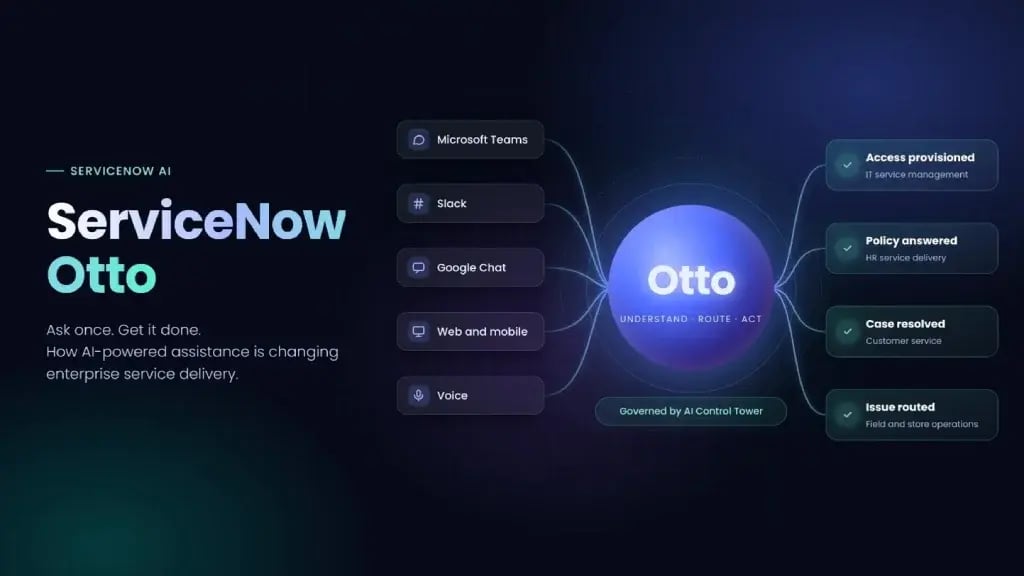
Otto is ServiceNow's unified AI experience: one place where people make requests in plain language and have them routed to the right agent or workflow, across departments and systems. Its actions are governed by the AI Control Tower.
Otto exists to fix what ServiceNow calls the "completion problem". Most enterprise AI answers questions inside one application, then hands the work back to the person. Otto is designed to complete the entire process: raise the request, obtain approval, update the record, and confirm completion.
Since the launch, ServiceNow has been moving its Now Assist branding to ServiceNow Otto across its documentation, community, and product hubs, so older material that says "Now Assist" is describing part of what is now Otto.
Otto at a glance
| Announced | May 5, 2026, at Knowledge 2026 in Las Vegas |
| Combines | Now Assist, Moveworks, and AI Experience (AIx) |
| Governed by | AI Control Tower |
| Initial availability | ServiceNow EmployeeWorks and AI Control Tower |
| Rollout | Rolling out across all ServiceNow products throughout 2026 |
| Licensing implications | No change to existing entitlements; capabilities depend on your tier |
Key Benefits of ServiceNow Otto
With the right groundwork, Otto's core benefit is that requests get resolved end to end.
- One place to ask: Employees and customers ask in Microsoft Teams, Slack, Google Chat, on the web or mobile, or by voice, without knowing which portal or team to use.
- End-to-end execution: Work runs through existing workflows and approvals, including cross-department requests, where those workflows already exist.
- Built-in governance: Every action follows platform permissions and is logged in AI Control Tower, but only if your permissions are clean to begin with.
- Enterprise context: Answers reflect the user's role, location, and department, drawing on your CMDB (configuration management database), case history, and knowledge, so answers are only as accurate as that data.
- Simpler licensing: AI capabilities are included across ServiceNow's product tiers, although the features and usage allowances vary by tier.
- More time for complex work: Routine requests resolve automatically once knowledge and catalog items are in good shape, freeing teams for escalations and judgment calls.
How ServiceNow Otto Brings Together Now Assist, Moveworks, and AI Experience
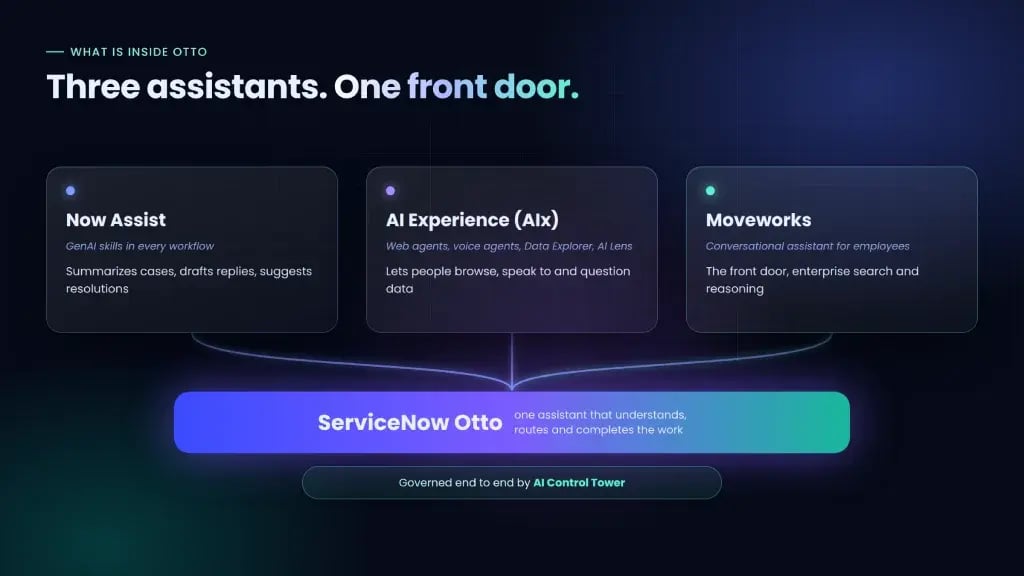
Now Assist made each ServiceNow module smarter. Otto unifies the capabilities of Now Assist, Moveworks, and AI Experience through a single access point, so users no longer need to know which AI, portal, or system handles their request. The table below outlines the role of each component within Otto.
| Component | What it was | What it does inside Otto |
|---|---|---|
| Now Assist | Generative AI skills built into each ServiceNow workflow | Summarizes cases, drafts replies, suggests resolutions, and powers skills inside the platform. |
| AI Experience (AIx) | AI web agents, AI voice agents, Data Explorer, and AI Lens | Lets people browse, speak to, and question data through AI. |
| Moveworks | Conversational AI assistant for employees, acquired by ServiceNow in a $2.85 billion deal announced in March 2025 and closed in December 2025 | Provides the conversational interface, enterprise search, and reasoning engine. |
What Can ServiceNow Otto Do?
Otto supports four key capabilities designed to complete requests rather than simply provide answers:
- Conversational AI: People ask for anything in natural language. Otto works out the intent and resolves it across departments without switching tools or navigating portals.
- Enterprise search: Otto searches documents, wikis, databases, and SharePoint and returns a direct answer tailored to the person's role, location, and department, not a list of links.
- AI voice agents: Requests are handled in natural spoken conversation, in multiple languages, with no menu trees or hold queues.
- AI Data Explorer: People query enterprise data in plain language and get analysis back.
What "completing requests" means in practice: Otto's actions run on the customer's own data, policies, approval chains, and organizational structure, according to ServiceNow. So, when Otto provisions software or updates an HR record, it follows the same rules as a person would.
How Does ServiceNow Otto Work?
Otto isn't a separate system you install. It works through the ServiceNow platform you already run, and every request follows the same five steps:
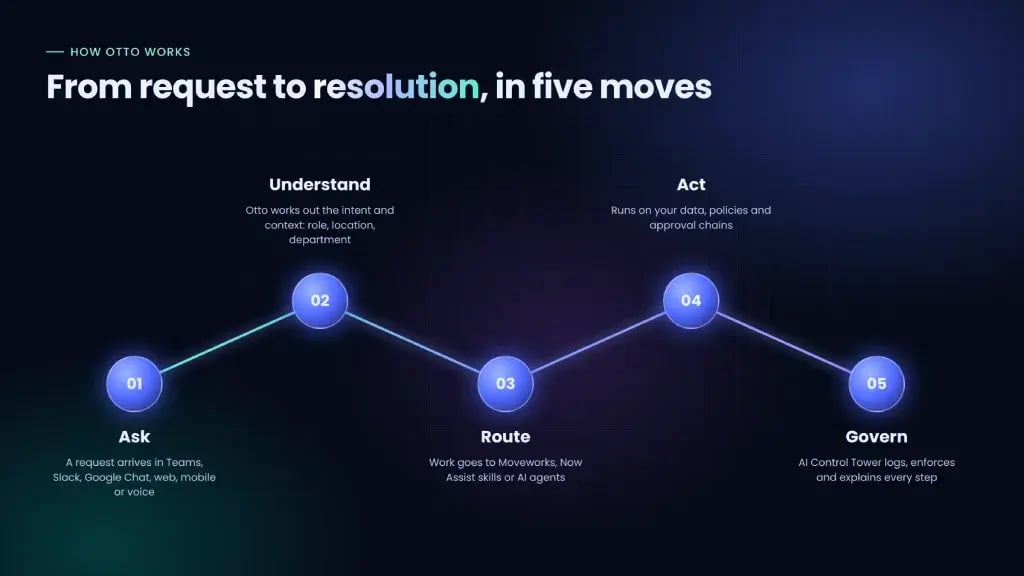
- Ask: A person makes a request in Microsoft Teams, Slack, Google Chat, on the web or mobile, or by voice.
- Understand: Otto identifies the intent and context, such as the person's role, location, and department.
- Route: Otto passes the work to the right engine: Moveworks for conversation and search, Now Assist skills inside workflows, or AI agents for multi-step work.
- Act: The work runs on your ServiceNow AI Platform data, policies, and approval chains, and across connected systems.
- Govern: AI Control Tower logs and governs every action (more on this in the governance section below).
ServiceNow Otto Use Cases Across ITSM, HR, and Customer Service
Otto's impact looks different in each service area. In IT, it resolves routine requests and speeds up incident work; in HR, it answers policy questions and handles employee lifecycle requests; and in customer service, it connects the customer conversation to the back-office work. Here's what that looks like in each area today.
ServiceNow Otto for IT Service Management
ITSM is where Otto is most mature, because both ServiceNow and Moveworks started there. Typical use cases include:
- Level 1 service desk: Password resets, access requests, and software installs, resolved in chat or by voice. ServiceNow reports its L1 AI Specialist resolves assigned cases 99% faster than human agents on its own help desk.
- Incident triage: Categorizing, prioritizing, and summarizing incidents for human agents.
- IT operations: AIOps remediation, site reliability triage, and asset lifecycle management.
Otto for HR and Employee Services
HR requests are high-volume and policy-driven, which suits conversational resolution. Use cases include:
- Policy and benefits questions, answered for the employee's role and location.
- Lifecycle requests such as leave, verification letters, and onboarding.
- Cross-department requests, like a new hire's laptop, access, and payroll, from one conversation.
Otto for Customer Service
For customer-facing teams, Otto and ServiceNow's CRM AI specialists aim to close the gap between the conversation and the back-office work. Use cases include:
- Case triage and resolution across channels through the CRM Case Management AI Specialist.
- Chat and voice self-service in multiple languages, with handoff to a person when needed.
- Order, billing, and dispute requests, handled by newer CRM specialists.
In every area, results depend on the quality of your knowledge base, workflows, and data.
Not sure where Otto fits in your ServiceNow environment? An Otto readiness assessment shows which requests Otto can complete first. Book your Otto readiness assessment →
How Is Otto Governed, and What Does It Cost?
AI Control Tower governs what Otto does. What you pay depends on two things: your product tier and how much AI you consume, which ServiceNow meters in Assist credits.
- Governance
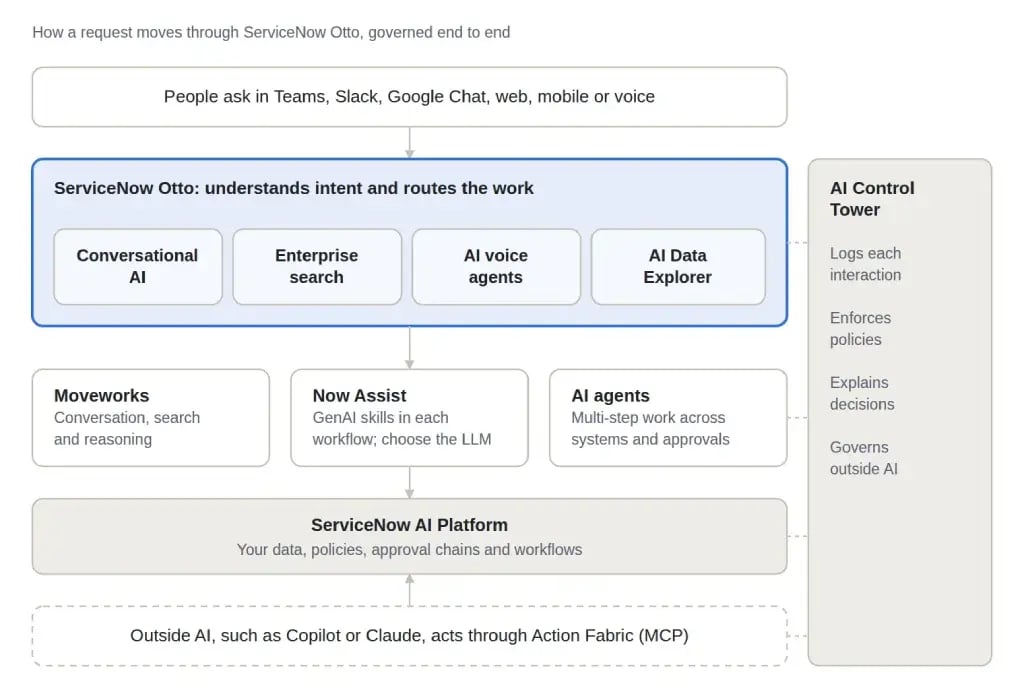
According to ServiceNow, AI Control Tower logs each AI interaction, enforces enterprise policies, and explains decisions. Administrators also choose which large language model powers each skill. Coverage is strongest for ServiceNow's own AI; outside AI is visible only as far as its connector allows.
- Outside AI
Many enterprises already use external AI tools such as Microsoft Copilot and Claude. ServiceNow's Action Fabric, an MCP (Model Context Protocol) server, lets these agents take governed actions inside ServiceNow, with each action identity-checked, permission-scoped, and audited in AI Control Tower. These actions use the same Assist credits as Now Assist, so include them in your consumption plan.
- ServiceNow Otto Licensing and Pricing
Otto doesn't need a separate license. Its AI capabilities come with your ServiceNow product tier, and AI consumption is measured separately.
In April 2026, ServiceNow simplified its product packaging. The five old tiers (Standard, Pro, Pro Plus, Enterprise, and Enterprise Plus) were replaced by three new ones: Foundation, Advanced, and Prime. Every tier includes Now Assist, Moveworks, Workflow Data Fabric, and AI Control Tower. Tiers are chosen per product, so you can hold ITSM Advanced and CSM Prime at the same time.
| Tier | AI level | What it typically adds (ITSM example) |
|---|---|---|
| Foundation | Task-based assistance | Incident, request, and asset management with out-of-the-box AI skills |
| Advanced | Agentic workflows | Change and problem management, AI voice agents, pre-built agentic workflows |
| Prime | Autonomous AI | L1 Service Desk AI Specialist, building custom AI agents and skills, largest usage allowance |
The real cost question isn't "Should we buy Otto?" It's "What does our current package already include, and how much AI will our use cases consume?" Book your ServiceNow Otto readiness assessment →
How Do ServiceNow Arc and Flow Relate to Otto?
Since Otto launched, ServiceNow has released two more products that readers often ask about. Both sit under the same governance model as Otto, but they solve different problems.
- ServiceNow Arc: a personal, long-running AI agent built with NVIDIA and generally available since October 21, 2026, as part of ServiceNow Employee Works. Arc plans and carries out multi-step work on behalf of one employee and runs as a desktop app (macOS first, with Windows to follow).
- ServiceNow Flow: a conversational, AI-native service desk launched on October 1, 2026. It works inside Slack and Microsoft Teams, deploys without an implementation project, and is sold as a standalone product that can also connect to the ServiceNow platform. Availability is controlled, starting with North America.
While ServiceNow Otto acts as the conversational experience layer that unifies enterprise workflows, ServiceNow Arc operates as the long-running autonomous desktop agent executing complex multi-step tasks across apps.
Both run securely under the orchestration of the Super Intelligence Control Tower, meaning they don't compete but rather work in tandem to drive full workflow automation.
How Should You Prepare for ServiceNow Otto?
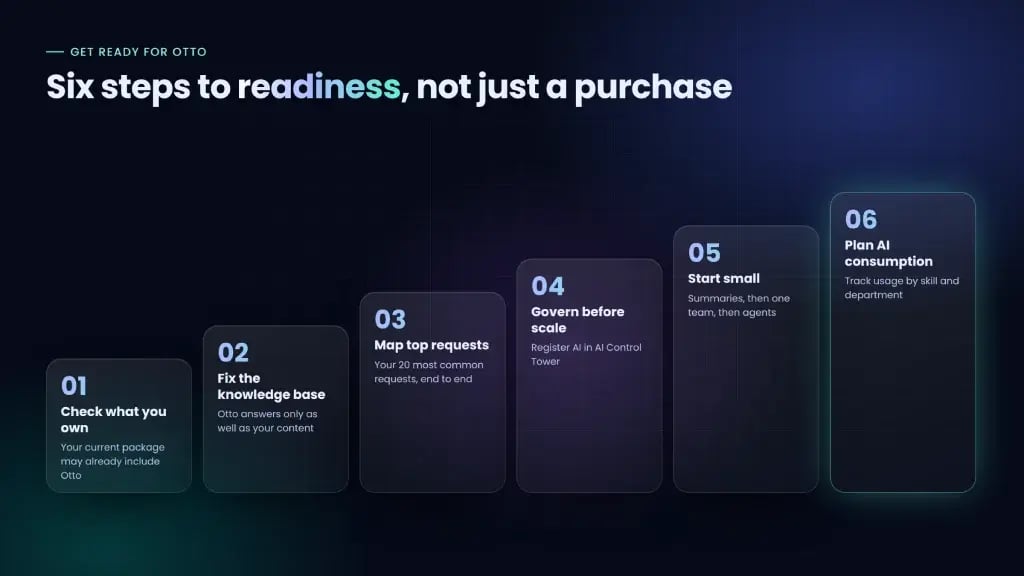
Otto is arriving in ServiceNow products gradually, so the work now is readiness, not purchase. These six steps can help organizations prepare for adoption, manage risks, and realize value early.
- 1. Check what you already own.
Review your current package and tier first so you don't pay for Otto capabilities you already have.
- 2. Fix the knowledge base.
Remove outdated articles, fill gaps, and assign owners, so Otto's answers are accurate and users trust it.
- 3. Map your top requests end to end.
List your 20 most common requests and the systems and approvals behind each. So you know what Otto can complete first.
- 4. Set up governance before scale.
Register AI assets in the AI Control Tower and define what Otto may do alone. So every action stays within clear limits.
- 5. Start small, then expand.
Move from knowledge answers to one team to multi-step agents, building confidence while keeping risk low.
- 6. Plan for AI consumption.
Track usage by skill and department and tune the busiest skills. So costs don't surprise you as adoption grows.
Challenges and Limitations of ServiceNow Otto
Organizations should consider the following limitations before planning a rollout. Some of Otto's limits come from the product, while others come from your environment. Know both before you plan a rollout.
Product Limitations
- 1. Phased, uneven availability: Otto launched in EmployeeWorks and AI Control Tower first, and other products and AI specialists are still rolling out. ITSM is the most mature, while customer service, finance, and legal are newer.
- 2. Limited model flexibility: Otto uses ServiceNow-managed models by default, and bring-your-own LLM doesn't cover every skill.
- 3. Vendor-reported benchmarks: ServiceNow's performance figures come from its own environment and may not match your results.
Organizational Challenges
- 4. Content quality dependency: Outdated knowledge or incomplete workflows lead to wrong answers or requests handed back to people.
- 5. Permissions outside ServiceNow: Enterprise search relies on each connected system's access controls, so gaps there can expose data Otto shouldn't show.
- 6. Adoption takes more than a license: Employees need training, and teams need new oversight roles.
Here's where most rollouts get stuck and how we help.
How V-Soft, a ServiceNow Premier Partner, Helps You Get Ready for Otto
V-Soft helps enterprises move beyond the Otto launch announcement and prepare their environments for safe, effective request completion. As a ServiceNow Premier Partner with practices across ITSM, CSM, HR Service Delivery, and AI governance, we work on the parts that decide whether Otto succeeds:
- Otto readiness assessment: We score your top requests against your current tier, so you know where to start and whether to buy anything.
- Knowledge and workflow clean-up: We fix content by request volume, so Otto can finish requests, not just answer them.
- AI governance with AI Control Tower: We map guardrails to your existing change and risk processes, so governance fits how you already work.
- Secure Integration: We connect ServiceNow to systems like SAP, Workday, and Salesforce with permissions mapped end to end.
- Adoption and optimization: We baseline metrics before go-live and turn every request Otto hands back into a fix.
From Our Work: What Enterprise ITSM & CMDB Readiness Looks Like
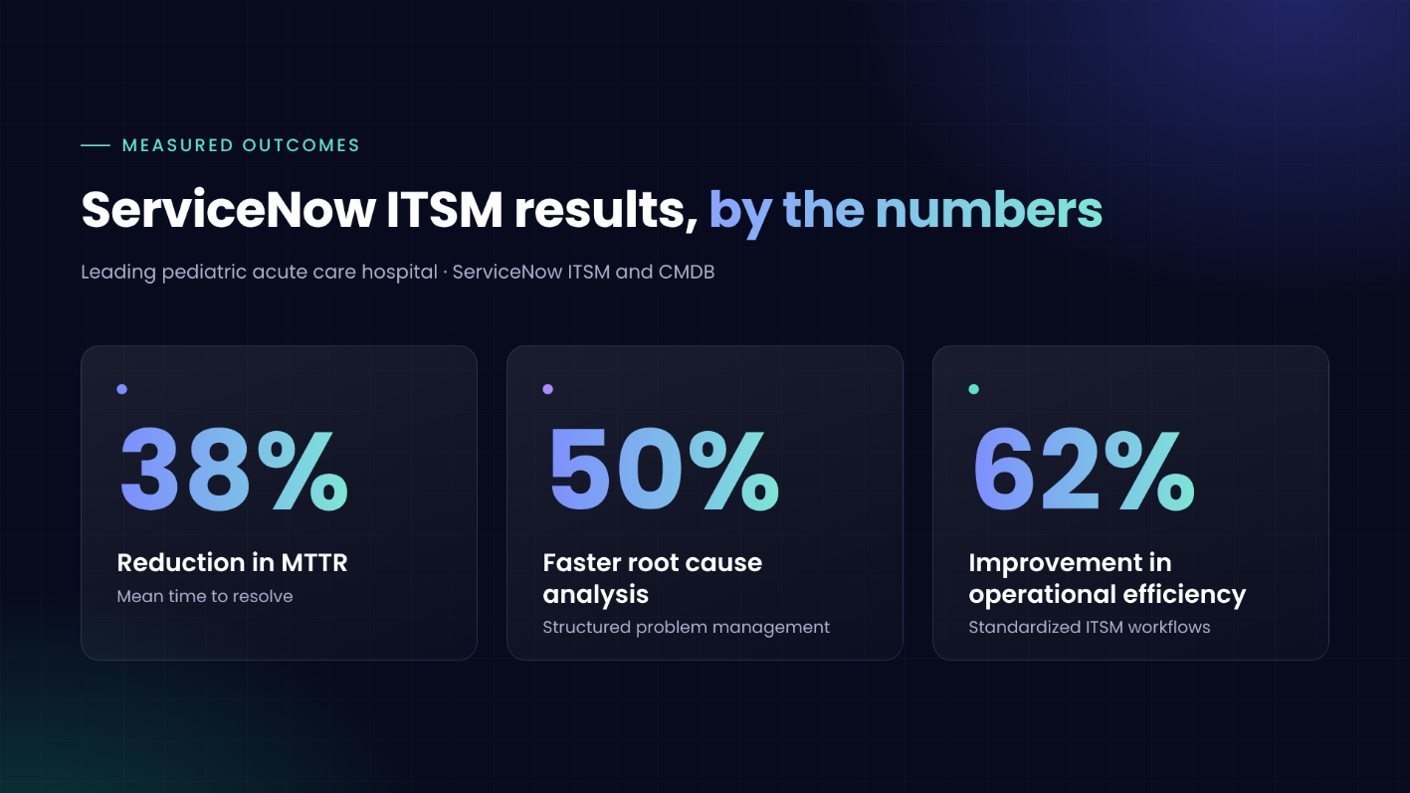
For a leading pediatric acute care hospital, V-Soft standardized Incident, Problem, and Change Management on ServiceNow ITSM, strengthened Knowledge Management and the CMDB, and rolled out a Service Portal, Service Catalog, and Request Management with operational dashboards.
The result: a 38% reduction in mean time to resolve (MTTR), 50% faster root cause analysis, and a 62% improvement in operational efficiency. That same groundwork, with clean knowledge, consistent workflows, and a reliable catalog, is what Otto needs to complete requests.
For organizations adopting Otto, the priority is clear: AI-powered service delivery requires well-governed knowledge, standardized workflows, and dependable operational data.
Read the full healthcare ITSM case study →Ready to see where Otto fits in your ServiceNow environment?
Book your Otto readiness assessment →